Introduction
If you’re planning to build a website in 2025, you’ll hear one name everywhere — WordPress. It powers blogs, business sites, eCommerce stores, portfolios, and even full-fledged online communities. But what exactly is WordPress? And why do more than 43% of the websites on the internet use it?
This beginner-friendly guide explains WordPress in simple terms and shows why it remains the most popular website builder in 2025.
What Is WordPress?
WordPress is a free, open-source Content Management System (CMS) that allows anyone to build and manage websites without needing advanced technical skills.
With WordPress, you can create:
- Blogs
- Business Websites
- Online Stores (WooCommerce)
- Portfolios
- Membership Sites
- eLearning Platforms
- Landing Pages
- News/ Magazine websites
It is user-friendly, flexible, scalable, and ideal for both beginners and developers.
WordPress.org vs WordPress.com — What’s the Difference?
This is the #1 confusion for beginners. Here’s the simple difference:
1. WordPress.org (Self-Hosted)
- Full control over your website
- Install any theme or plugin
- Best for serious blogs, business sites, and eCommerce
- Requires hosting
Recommended for 99% of users
2. WordPress.com (Hosted Service)
- Limited features (in free plan)
- No custom plugins unless on a paid plan
- Good for hobby blogs
Better for beginners who do not want hosting
Why WordPress Remains Popular in 2025
✔ 1. Free & Open Source
No licensing fees. You own your website completely.
✔ 2. Beginner-Friendly
Easy-to-use dashboard + drag-and-drop builders (Elementor, Gutenberg).
✔ 3. Thousands of Themes
Free and premium themes to design any type of site.
✔ 4. Plugins Add Unlimited Features
Over 60,000 plugins available for SEO, contact forms, backups, security, and more.
✔ 5. SEO Friendly
Clean code, fast performance, and SEO plugins like RankMath help you rank easily.
✔ 6. Works for Any Type of Website
Small blogs to big eCommerce stores — WordPress scales easily.
How WordPress Works (Simple Explanation)
WordPress has four main components:
1. Themes → Website Design
Themes control layout, colors, fonts, and overall look.
2. Plugins → Extra Features
Want a contact form? SEO tool? eCommerce store?
Install a plugin — no coding required.
3. Dashboard → Where You Manage Your Site
Create pages, write posts, upload images, install plugins — all from one panel.
4. Database → Stores All Your Content
Posts, pages, settings, users — everything is stored securely.
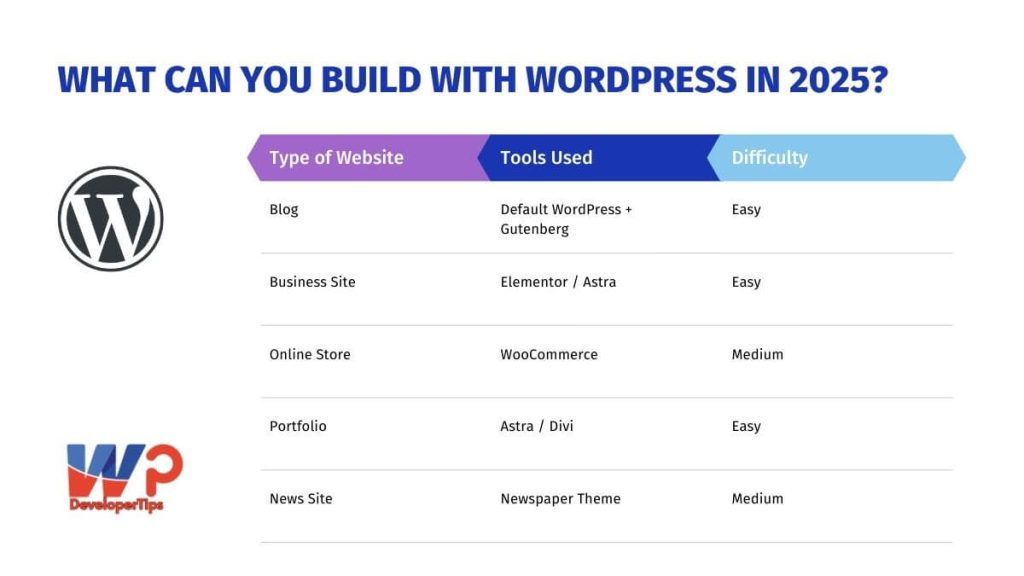
What Can You Build With WordPress in 2025?
How to Get Started With WordPress (Step-by-Step)
Step 1: Choose a Domain & Hosting
Recommended hosting providers:
Step 2: Install WordPress
Most hosting panels support 1-click install.
Step 3: Install a Theme
Beginner-friendly themes:
- Astra
- GeneratePress
- Hello Elementor
Step 4: Install Essential Plugins
Step 5: Start Creating Pages
Home, About, Services, Blog, Contact, etc.
Is WordPress Secure in 2025?
Yes — but only if you follow good practices:
- Keep WordPress updated
- Use secure hosting
- Install SSL
- Use a security plugin (Wordfence / iThemes Security)
- Take regular backups
Is WordPress Good for SEO?
Absolutely. WordPress is highly SEO-friendly because:
- It creates clean, fast pages
- Supports schema markup
- Has powerful SEO plugins
- Works great with Google Core Web Vitals
Who Should Use WordPress in 2025?
WordPress is perfect for:
- Bloggers
- Small businesses
- Startups
- Digital agencies
- eCommerce store owners
- Developers & designers
- Content creators
If you want full control, flexibility, and affordability — WordPress is the best choice.
Conclusion
WordPress remains the most powerful and beginner-friendly website platform in 2025. Whether you’re planning to start a blog, build a business site, or launch an online store, WordPress gives you the tools, freedom, and scalability to grow.
If you’re new, start with the basics — hosting, themes, and essential plugins — and gradually explore advanced features.